LaTeX wargame package
The wargame package1 is designed to help create classic Hex’n’Counter wargames and relies heavily on the PGF/TikZ2 vector drawing layer. The most interesting feature for me today is its ability to draw detailed hexagonal maps. Instead of going through all features (which would take unreasonably long and is already covered better in official sources), I'll create a sample map based on my remake of the map from The Stones, the Ship and the Fortress conversion, highlighting the most important pieces of code in the process.
📝 Additional references:
- documentation: http://mirrors.ctan.org/macros/latex/contrib/wargame/doc/wargame.pdf
- tutorial: https://gitlab.com/wargames_tex/wargame_tex/-/jobs/9450028026/artifacts/file/doc/latex/wargame/tutorial.pdf
- examples: https://gitlab.com/wargames_tex/wargame_tex#examples
Contents
- Hex coordinate system
- The defaults
- TikZpicture
- Hexes
- Arrows and marks
- Paths
- Lake
- Custom pics
- Full source code
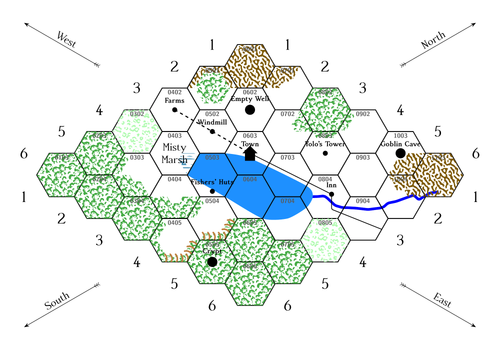
As you see, I've reduced the dimensions in half to shorten the code.
Hex coordinate system ↩
Throughout the code, you will see constant usage of the hex coordinate system from the wargame package (See Section 2.4 in the documentation3):
(hex cs:c=1,r=2,v=E,e=S)
The following keys are supported:
c— hex column indexr— hex row indexv— hex vertex (compass directions:E,NE,NW,W,SW,SE)e— hex edge (compass directions:NE,N,NW,SW,S,SE)
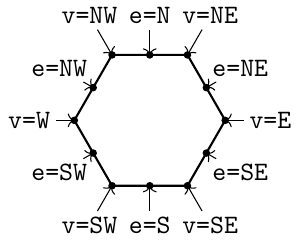
You can use this coordinate system to place various TikZ elements inside a particular hex:
\node[align=center] at (0403) {Misty\\Marsh};% node placed by the hex name (0403)
Offset calculations are also possible by wrapping the whole expression in $(...+(x,y))$, e.g., the following expression will offset the relative position by 0.25 horizontally:
($(hex cs:c=8,r=4,v=W)+(0.25,0)$)
The defaults ↩
You can modify the default styles using the /.style and /.append style keys in the \tikzset command:
\tikzset{%
	hex/label is name,% every hex is a named node
	hex/row direction is=down,% start row numbering from the top
	every hex/.style={% default hex style
		/hex/label={auto,color=black!65},% two-digit, zero padded numbers
	},
	every hex town/.style={% default town style
	},
	hex/town name/.append style={% overriding the defaults
		above=.15,% name centered above the town
		font=\bfseries\fontsize{8}{10}\selectfont
	}%
}%
TikZpicture ↩
The whole map is drawn inside the tikzpicture environment, scaled to fit the page:
\begin{tikzpicture}[scale=0.85]

...

\end{tikzpicture}
Hexes ↩
Each hex is described by its contents [in square brackets] and coordinates in the hex coordinate system (in parentheses):
\hex[terrain={...}, town={...}, ...](c=1,r=2)
The full list of contents keys in rendering order:
terrain- the hex itself
ridgeslabelextra clippedbeveltownextra
The hexes are 2 unit lengths wide (from -1 to 1) and about 1.74 unit lengths high (from -0.87 to 0.87). Keep in mind that TikZ's Y-axis goes up by default.
Terrain ↩
Specifies the terrain image for the hex:
\hex[terrain=woods](c=9,r=3)
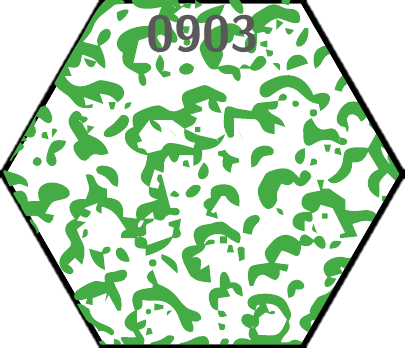
The default terrain types:
beachmountainsroughswampwoodslight woods
You can also specify a custom TikZ image by using the pic key:
\hex[terrain={	pic=hex/terrain/mountain,
		line width=1pt,
		},% terrain
	](c=9,r=3)
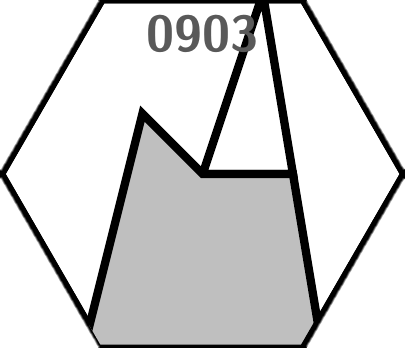
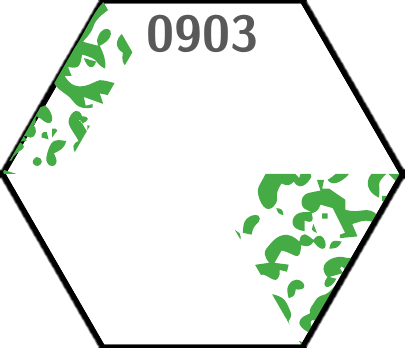
Similarly to edges and vectors, clip options for hex/sextant and hex/large sextant are coded by compass direction, plus the Center one.
\hex[terrain={	image=wargame.woods,
		clip={	hex/sextant=NW,
			hex/large sextant=SE,
			},% clip
		},% terrain
	](c=9,r=3)
Ridges ↩
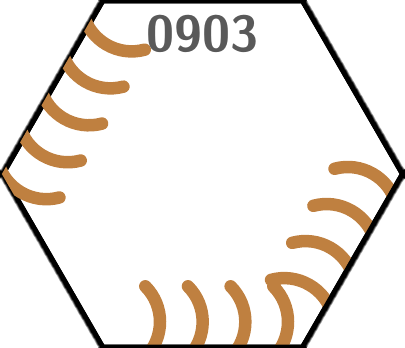
Similarly, ridges take a list of hex edges, along with the other possible styling options:
\hex[ridges={	S,SE,
		color=brown,
		line width=1.5px,
		}% ridges
	](c=9,r=3)
Label ↩
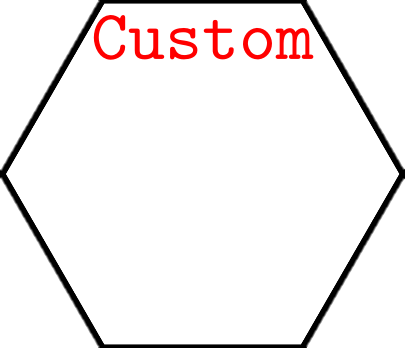
You can change the default text on top of the hex. It can take the value of none or auto, as well as additional keys:
anchor— TikZ anchor position (cardinal directions) of the textcolor— text colorfont— text font, you must add\noexpandin front of the macro to prevent early expansionplace— location of the anchor point within the hextext— custom text
\hex[label={	text=Custom,
		color=red,
		font=\noexpand\ttfamily
		}% label
	](c=9,r=3)
Bevel ↩
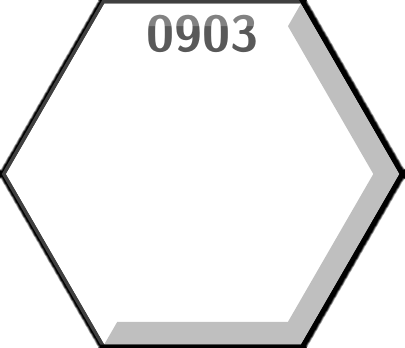
"3D shadow" effect around hexes. Accepts the following keys:
bevel— light direction in compass directionbevel fraction— The percentage of the half width of a chit of the bevel (default10)
\hex[bevel=NW, bevel fraction=15](c=9,r=3)
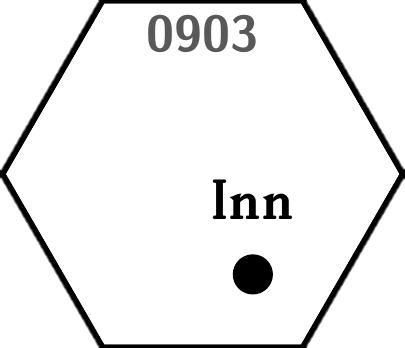
Town ↩
The following keys are possible for the towns:
pic— TikZ picture, such as provided by the package:hex/town/villagehex/town/town(default)hex/town/city
\hex[town={	pic=hex/town/village,
		name=Inn,
		place={(.25,-.5)}
		},% town
	](c=9,r=3)
Extra ↩
The extra and extra clipped keys allow additional graphics to be added to the hexes. The latter will be clipped to the hex shape, while the former will be drawn on top of all other elements.
Various options can be specified inside the square brackets before the image name. The syntax becomes somewhat convoluted if you cave multiple keys, though:
\hex[extra={[{	color=brown,
		scale=.5,
		shift={(0,-.5)},
		}]% end of options, note the absence of a comma here
		hex/fortress
		},% extra
	](c=9,r=3)
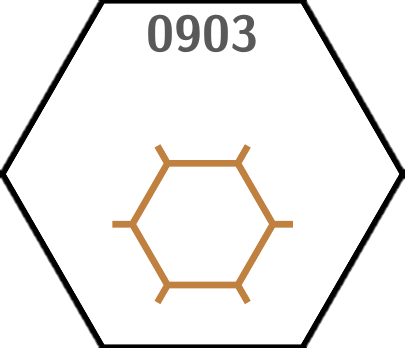
You can also specify multiple images, separating them by commas.
Arrows and marks ↩
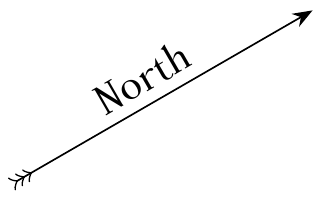
Arrows are drawn using the normal TikZ commands wrapped in a custom command for ease of use. TikZ allows for a wide variety of arrow styles. Consult the PGF/TikZ manual4 for additional details.
% draw direction arrow from #1 to #2
\newcommand{\direction}[2]{%
	\draw[{to reversed}{to reversed}{to reversed}-Stealth] (#1) -- (#2);
}

...

\direction{hex cs:c=10,r=1}{hex cs:c=12,r=0}
\node at ($(hex cs:c=11,r=0)+(-.2,.2)$) {\rotatebox{30}{North}};
The border marks are written similarly, specifying the font size (\Large):
\node at (hex cs:c=5,r=0) {\Large 1};
Paths ↩
The following macros for drawing styled paths are provided by the wargame package:
\border\railroad\river\road
\river
	($(hex cs:c=11,r=3,e=S)+(0,.2)$)
	--(hex cs:c=10,r=4,e=SW)
	--(hex cs:c=9,r=4,e=NW)
	--(hex cs:c=8,r=4)
	--($(hex cs:c=8,r=4,v=W)+(0.25,0)$);
Lake ↩
We'll just use the TikZ's \fill command combined with plot[smooth] to achieve smooth corners in the simplest way. Use the tension key to adjust the smoothness of the corners:
\fill[DodgerBlue] plot[smooth, tension=0.4] coordinates {%
	(hex cs:c=5,r=3,v=NW)
	(hex cs:c=5,r=3,v=NE)
	($(hex cs:c=6,r=3)+(0,-.2)$)
	(hex cs:c=7,r=3,e=SE)
	($(hex cs:c=8,r=4)+(-.5,0)$)
	(hex cs:c=8,r=4,e=SW)
	(hex cs:c=7,r=4)
	(hex cs:c=7,r=4,v=W)
	(hex cs:c=6,r=4,v=W)
	(hex cs:c=5,r=3,v=W)};
Custom pics ↩
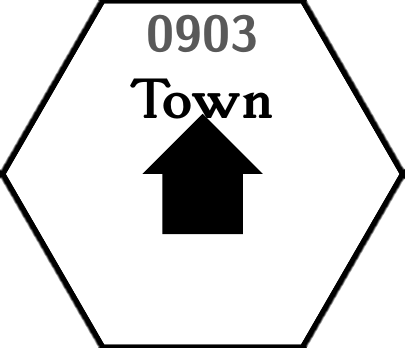
By using TikZ, you can draw or import a custom image to use in your maps. Let's create a custom town pic:
\tikzset{custom town/.pic={%
		code={% your code goes here:
			\fill[black]
			  ( .0, .3)
			--( .3, .0)
			--( .2, .0)
			--( .2,-.3)
			--(-.2,-.3)
			--(-.2, .0)
			--(-.3, .0)
			--cycle;
		}
	}
}
Now you can use it like this:
\hex[town={	pic=custom town,
		name=Town,
		},% town
	](c=9,r=3)
Full source code ↩
Click to show/hide
\tikzset{custom town/.pic={%
		code={% your code goes here:
			\fill[black]
			  ( .0, .3)
			--( .3, .0)
			--( .2, .0)
			--( .2,-.3)
			--(-.2,-.3)
			--(-.2, .0)
			--(-.3, .0)
			--cycle;
		}
	}
}

\tikzset{%
	hex/label is name,% every hex is a named node
	hex/row direction is=down,% start row numbering from the top
	every hex/.style={% default hex style
		/hex/label={auto,color=black!65},% two-digit, zero padded numbers
	},
	every hex town/.style={% default town style
	},
	hex/town name/.append style={% overriding the defaults
		above=.15,% name centered above the town
		font=\bfseries\fontsize{8}{10}\selectfont
	}
}

% draw direction arrow from #1 to #2
\newcommand{\direction}[2]{%
	\draw[{to reversed}{to reversed}{to reversed}-Stealth] (#1) -- (#2);
}


\begin{tikzpicture}[scale=0.85]

% west border marks
\direction{hex cs:c=2,r=1}{hex cs:c=0,r=0}
\node at ($(hex cs:c=1,r=0)+(.2,.2)$) {\rotatebox{-30}{West}};
\node at (hex cs:c=5,r=0) {\Large 1};
\node at (hex cs:c=4,r=1) {\Large 2};
\node at (hex cs:c=3,r=1) {\Large 3};
\node at (hex cs:c=2,r=2) {\Large 4};
\node at (hex cs:c=1,r=2) {\Large 5};
\node at (hex cs:c=0,r=3) {\Large 6};

% north border marks
\direction{hex cs:c=10,r=1}{hex cs:c=12,r=0}
\node at ($(hex cs:c=11,r=0)+(-.2,.2)$) {\rotatebox{30}{North}};
\node at (hex cs:c=7,r=0) {\Large 1};
\node at (hex cs:c=8,r=1) {\Large 2};
\node at (hex cs:c=9,r=1) {\Large 3};
\node at (hex cs:c=10,r=2) {\Large 4};
\node at (hex cs:c=11,r=2) {\Large 5};
\node at (hex cs:c=12,r=3) {\Large 6};

% east border marks
\direction{hex cs:c=10,r=6}{hex cs:c=12,r=7}
\node at ($(hex cs:c=11,r=6)+(.2,.2)$) {\rotatebox{-30}{East}};
\node at (hex cs:c=12,r=4) {\Large 1};
\node at (hex cs:c=11,r=4) {\Large 2};
\node at (hex cs:c=10,r=5) {\Large 3};
\node at (hex cs:c=9,r=5) {\Large 4};
\node at (hex cs:c=8,r=6) {\Large 5};
\node at (hex cs:c=7,r=6) {\Large 6};

% south border marks
\direction{hex cs:c=2,r=6}{hex cs:c=0,r=7}
\node at ($(hex cs:c=1,r=6)+(-.2,.2)$) {\rotatebox{30}{South}};
\node at (hex cs:c=0,r=4) {\Large 1};
\node at (hex cs:c=1,r=4) {\Large 2};
\node at (hex cs:c=2,r=5) {\Large 3};
\node at (hex cs:c=3,r=5) {\Large 4};
\node at (hex cs:c=4,r=6) {\Large 5};
\node at (hex cs:c=5,r=6) {\Large 6};

% RIVER
\river
	($(hex cs:c=11,r=3,e=S)+(0,.2)$)
	--(hex cs:c=10,r=4,e=SW)
	--(hex cs:c=9,r=4,e=NW)
	--(hex cs:c=8,r=4)
	--($(hex cs:c=8,r=4,v=W)+(0.25,0)$);

% LAKE
\fill[DodgerBlue] plot[smooth, tension=0.4] coordinates {%
	(hex cs:c=5,r=3,v=NW)
	(hex cs:c=5,r=3,v=NE)
	($(hex cs:c=6,r=3)+(0,-.2)$)
	(hex cs:c=7,r=3,e=SE)
	($(hex cs:c=8,r=4)+(-.5,0)$)
	(hex cs:c=8,r=4,e=SW)
	(hex cs:c=7,r=4)
	(hex cs:c=7,r=4,v=W)
	(hex cs:c=6,r=4,v=W)
	(hex cs:c=5,r=3,v=W)};

% ROAD
\border[color=black]
	(hex cs:c=4,r=2)
	--(hex cs:c=5,r=2)
	--(hex cs:c=6,r=3);

\road
	(hex cs:c=6,r=3)
	--($(hex cs:c=8,r=4)+(.25,.1)$)
	--($(hex cs:c=8,r=4)+(.25,-.5)$)
	--(hex cs:c=9,r=4,e=SE);

% COL 1

\hex[terrain=woods]
	(c=1,r=3)

% COL 2

\hex[terrain=woods]
	(c=2,r=3)

\hex[terrain=woods]
	(c=2,r=4)

% COL 3

\hex[terrain=light woods]
	(c=3,r=2)

\hex[terrain={	image=wargame.woods,
		clip={	hex/sextant=NW,
			hex/large sextant=SW,
			hex/large sextant=S,
			},% clip
		},% terrain
	](c=3,r=3)

\hex[terrain=woods]
	(c=3,r=4)

% COL 4

\hex[town={	pic=hex/town/village,
		name=Farms,
		},% town
	](c=4,r=2)

\hex[terrain={	image=wargame.swamp,
		clip={	hex/large sextant=SE,
			},% clip
		},% terrain
	](c=4,r=3)

\node[align=center] at (0403) {Misty\\Marsh};% node placed by the hex name (0403)

\hex[terrain={	image=wargame.woods,
		clip={	hex/large sextant=SW,
			hex/large sextant=S,
			hex/large sextant=SE,
			},% clip
		},% terrain
	](c=4,r=4)

\hex[terrain={	image=wargame.woods,
		clip={	hex/sextant=NW,
			hex/sextant=SW,
			hex/sextant=S,
			hex/sextant=SE,
			},% clip
		},% terrain
	ridges={	S,SE,
			color=brown,
			line width=1.5px,
		},% ridges
	](c=4,r=5)

% COL 5

\hex[terrain={	image=wargame.mountains,
		clip={	hex/sextant=NW,
			hex/sextant=N,
			hex/sextant=NE,
			},% clip
		},% terrain
	](c=5,r=1)

\hex[terrain={	image=wargame.woods,
		clip={	hex/sextant=C,
			},% clip
		},% terrain
	](c=5,r=1)

\hex[town={	pic=hex/town/village,
		name=Windmill,
		},% town
	](c=5,r=2)

\hex[town={	pic=hex/town/village,
		name=Fishers' Huts,
		place={(0,-.65)},
		},% town
	](c=5,r=3)

\hex[terrain={	image=wargame.woods,
		clip={	hex/sextant=NW,
			hex/sextant=SE,
			hex/sextant=S,
			},% clip
		},% terrain
	ridges={	S,SE,
			color=brown,
			line width=1.5px,
		},% ridges
	](c=5,r=4)

\hex[terrain=woods,
	town={	name=Crypt,
		},% town
	](c=5,r=5)

% COL 6

\hex[terrain=mountains]
	(c=6,r=1)

\hex[town={	name=Empty Well,
		},% town
	](c=6,r=2)

\hex[town={	pic=custom town,
		name=Town,
		},% town
	](c=6,r=3)

\hex(c=6,r=4)

\hex[terrain=woods]
	(c=6,r=5)

\hex[terrain=woods]
	(c=6,r=6)

% col 7
\hex[terrain={	image=wargame.mountains,
		clip={	hex/large sextant=NW,
			hex/large sextant=N,
			},% clip
		},% terrain
	](c=7,r=1)

\hex[terrain={	image=wargame.woods,
		clip={	hex/large sextant=NE,
			},% clip
		},% terrain
	](c=7,r=2)

\hex(c=7,r=3)

\hex(c=7,r=4)

\hex[terrain=woods]
	(c=7,r=5)

% COL 8

\hex[terrain=woods]
	(c=8,r=2)

\hex[terrain={	image=wargame.woods,
		clip={	hex/sextant=N,
			},% clip
		},% terrain
	town={	pic=hex/town/village,
		name=Yolo's Tower,
		},% town
	](c=8,r=3)

\hex[town={	pic=hex/town/village,
		name=Inn,
		place={(.25,0.1)},
		},% town
	](c=8,r=4)

\hex[terrain=light woods]
	(c=8,r=5)

% COL 9

\hex[terrain={	image=wargame.woods,
		clip={	hex/sextant=NW,
			},% clip
		},% terrain
	](c=9,r=2)

\hex(c=9,r=3)

\hex(c=9,r=4)

% COL 10

\hex[terrain={	image=wargame.mountains,
		clip={	hex/large sextant=SE,
			hex/large sextant=S,
			},% clip
		},% terrain
	town={	name=Goblin Cave,
		},% town
	](c=10,r=3)

\hex[terrain={	image=wargame.mountains,
		clip={	hex/large sextant=N,
			hex/large sextant=NE,
			},% clip
		},% terrain
	](c=10,r=4)

% COL 11

\hex[terrain=mountains]
	(c=11,r=3)

\end{tikzpicture}
Discuss this post on Reddit